The baby tracker that shows your day’s rhythm
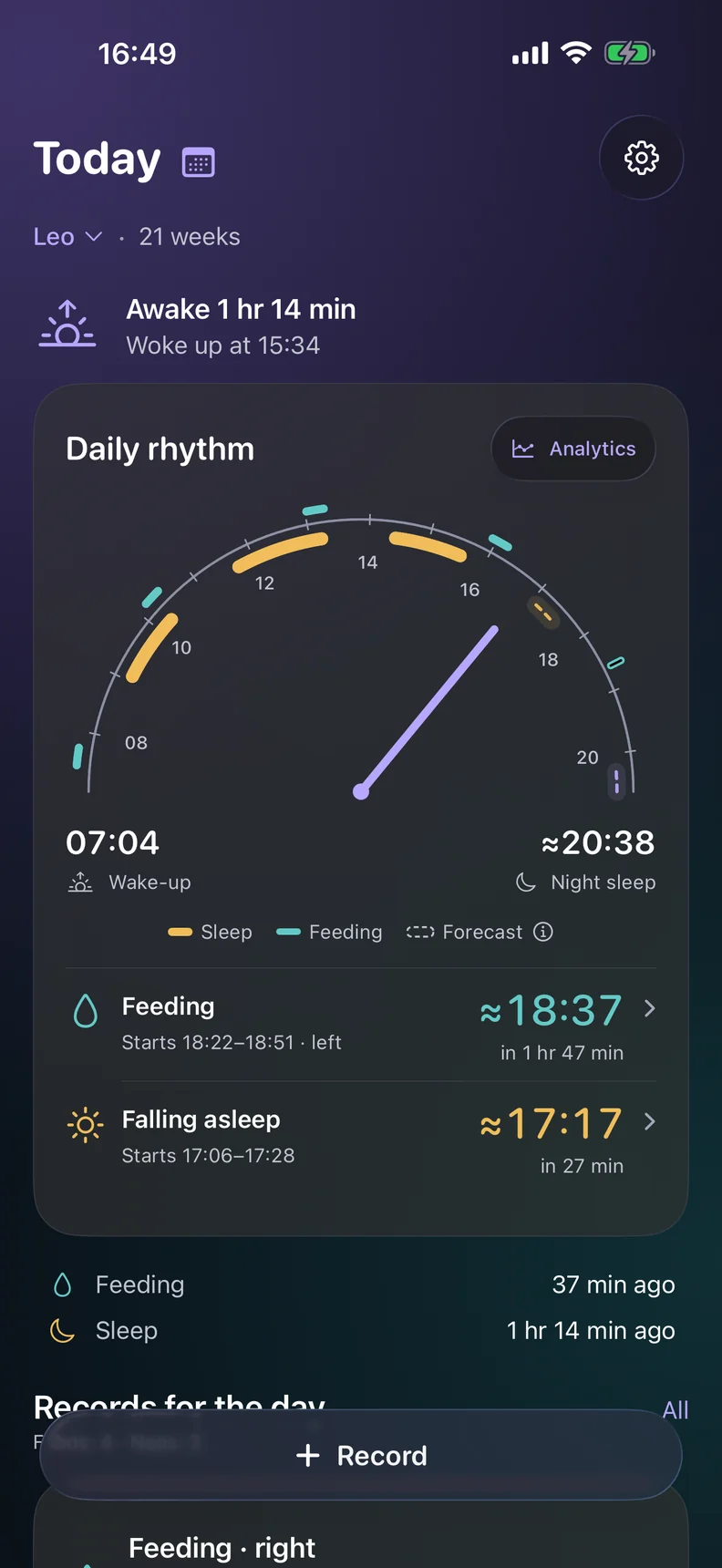
Log sleep, feeds, solids and diapers in a couple of taps. The home screen shows when your baby is likely to want the next nap and the next feed. One diary for the whole family, and it works offline.

Rytmi is on iPhone for now. The Android app isn’t on Google Play yet.
For iPhone · free · no ads
Sleep and wake time One-tap timer, naps and night sleep kept apart
Feeds and solids Breast, bottle, expressed milk and first foods
Up to five adults A partner, grandparent or nanny, invited by link or QR code
Works offline Entries save instantly and sync when you’re back online
Two taps and it’s in the diary
A nap or a feed starts with one button, and night sleep can be paused and resumed. Bottles with the amount, expressed milk, diapers and solids are all in the menu, and growth can be turned on in Settings.
Missed one at 3 a.m.? Add it in the morning with the right time. Metric or US units (oz, lb, in) and 12-hour time follow your iPhone’s region, and event types you don’t use can be hidden.

A running feed stays in view
Start a breastfeed or a bottle and a timer card sits on top of the diary. Switch sides right on the card, each side is timed separately, and a bottle’s amount can be set while it is still going.

What your baby has tried, and how it went
56 foods with pictures in nine groups: vegetables, cereals, fruit, meat, fish, dairy and more. Log a taste right from its tile, in spoons or grams, and mark how it went. The groups show what your baby has tried and what is still ahead.


Every reaction, and every food’s story
If there was a reaction, such as a rash, redness or bloating, mark it in the entry. Rytmi remembers which foods came with a reaction and keeps the history of each one. Missing a food? Add your own.
When your baby turns 4 months, Rytmi congratulates you and shows where to log first tastes.

One diary for everyone who helps
Your partner, a grandparent or a nanny opens the same diary, up to five adults in all. Everyone logs from their own phone, and everyone sees the same thing.
- Invite with a link or a QR code
- Revoke access at any time
- The same estimates on every phone
- Each child has their own diary and insights
Your baby’s normal, not someone else’s schedule
The last three full days are compared with what is typical for your baby: total sleep, day and night sleep, wake windows, the first nap. If something has shifted, it shows up on its own line.

When your baby usually falls asleep
Wake windows over the last few days, usual sleep and wake-up times, and charts of sleep and feeds for any period. Estimates start from age-based ranges and adjust to your baby’s own history.

Every entry, right where you left it
All events in one list, with search and a filter by type. Open any entry to fix the time or delete it. Sleep that runs past midnight stays one entry and is split correctly between the two days.

Log sleep and feeds without unlocking
With a baby in your arms, opening an app is one step too many. Start a log from a widget, from the Lock Screen or by voice.
Widgets Start a nap or a feed from the Home Screen or the Lock Screen
Live Activities A running nap or feed stays in view on the Lock Screen and in the Dynamic Island
Siri “Rytmi, start sleep” and “Rytmi, when is the next nap” work with no setup
Reminders For naps and feeds, from your baby’s own estimates, with quiet hours
Your diary stays yours
What you write about your child is private. Rytmi doesn’t sell data or show ads, and only the people you invite can open your diary.
- Diary details never appear in notifications
- The database on your phone is encrypted
- No ads and no tracking across apps
- Delete your account and every entry from Settings
Questions
How much does it cost?
Rytmi is free right now, with no ads and no in-app purchases.
How do I add my partner?
Open Settings → Family and access, tap “Invite a family member” and send the link or show the QR code. Your partner opens the link or scans the code, signs in and sees the same diary. The invitation works for 24 hours. A family can have up to five adults.
Does Rytmi tell me which foods to start with?
No. Rytmi has no weaning plans or rules: what to introduce and when is best decided with your pediatrician. It keeps track of what your baby has tried, how much, how it went and whether there was a reaction.
What if my phone was offline?
Nothing is lost: entries are saved on the phone and sync once you are back online.
What if I have twins?
Each child gets their own diary, estimates and insights. You switch between them with one tap on the home screen.
Do I need an account?
Yes. The diary lives in your account, so nothing is lost when you change phones and your family sees the same diary. Sign in with a code sent to your email, no password needed.
Is there an Android version?
Not on Google Play yet. Right now Rytmi is available for iPhone with iOS 17 or later.
Start with today
Log the first nap and you’ll see an estimate for the next one right away. It gets more accurate every day.
Rytmi is on iPhone for now. The Android app isn’t on Google Play yet.
For iPhone · free · no ads
Estimates are for planning the day, not medical advice. For questions about your child’s health, feeding and development, talk to your pediatrician.